Parsing Network Device Output Part 3: CiscoConfParse
Table of Contents
In the first post in this series, I talked briefly about utilizing Regular Expressions (Regex) to parse network device output. Next, I delved into the difference between status and configuration when it comes to network device output, and why you might use one tool vs another depending on which type of output you are working with.
As a brief refresher, network device output (from a traditional CLI session) can generally come in two forms:
- Status
- An output that presents some attribute or information about the current state of the device or its performance.
- Example commands for gathering status include:
show versionshow interfaces
- Example commands for modifying status include:
clear countersreload
- Configuration
- An output that presents the desired/requested operating condition of the device.
- Example commands for gathering configuration include:
show running-configshow startup-config
In this post, we’ll look at one of the open-source parsing libraries that exist for network device configuration: CiscoConfParse.
Why Not Just Use Regex?
CiscoConfParse, as well as Hierarchical Configuration (heir_config) which we’ll cover in the next post, provide much more power than simply using Regex to match and extract a pattern from a line of status or configuration. These parsing libraries provide a framework to understand and manipulate “Cisco style” configuration (with indented blocks representing related items), or even “Juniper style” curly brace ({}) delineated configuration.
If you think about the previous Regex example, how would we utilize Regex to easily parse the following configuration output, specifically looking to answer this question:
What interfaces have security-level 0 configured on them?
!
 interface GigabitEthernet0/0
  description OUTSIDE-VLAN300-10.10.10.0/24
  nameif OUTSIDE
  security-level 0
  ip address 10.10.10.50 255.255.255.0
 !
 interface GigabitEthernet0/1
  no nameif
  no security-level
  no ip address
 !
 interface GigabitEthernet0/1.400
  description INSIDE-VLAN400-10.10.40.0/24
  vlan 400
  nameif INSIDE
  security-level 100
  ip address 10.10.40.1 255.255.255.0
 !
interface Management0/0
  management-only
  nameif MGMT
  security-level 0
  ip address 10.10.60.2 255.255.255.0
For example, you can certainly search for the string “security-level 0”, however how do you then tie it back to the interface above it? Remember that when we’re evaluating a string with Regex, we can work on a multi-line string.
We would have to set up capturing groups for the interface and nameif, and then only match if there was also our target string.
And while, of course, this is doable, it quickly becomes cumbersome to do for every item you wish to match.
Also consider, what if you want to output the entire interface configuration for any interface that matches “security-level 0”?
There is a better and simpler way to handle this.
Enter CiscoConfParse
CiscoConfParse solves this problem, and more, by breaking the configuration into parent/child chunks and allowing you to search and find based on the contents of either. For an in-depth walk-through and examples I highly recommend the CiscoConfParse documentation; below we’ll simply demonstrate a quick use case.
For our test environment, we’re utilizing the same firewall pair and management station from the previous post:
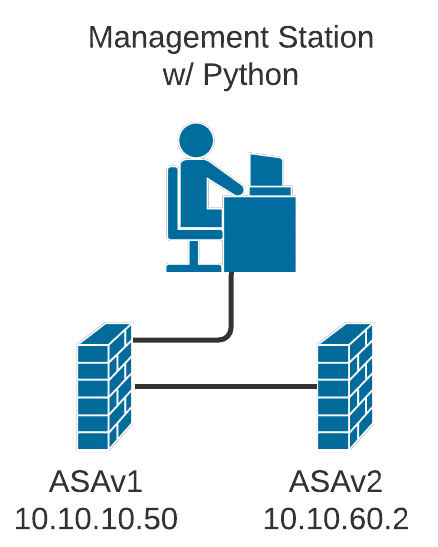
In this series of posts, we’ll just use the simple network shown here. There is a Management Station with Python 3.8 installed, and two Cisco ASAv firewalls (ASAv1 and ASAv2) in a tiered setup.
Code samples and requirements.txt for this post can be found on my Github.
Below is an example script, based on the previous examples in this series, where we log into these ASAs, gather the output of show run interface, and print out the interface(s) with security-level 0 configured.
| |
It will produce the following output when executed:
Username: cisco
Password:
Connecting to ASAv1…
Connecting to ASAv2…
Parsing Results…
==== ==== [ ASAv1 "Outside" interfaces ] ==== ====
     ==== [ interface GigabitEthernet0/0 ] ====
interface GigabitEthernet0/0
 description OUTSIDE-VLAN300-10.10.10.0/24
 nameif OUTSIDE
 security-level 0
 ip address 10.10.10.50 255.255.255.0
 ospf authentication-key
 ospf message-digest-key 1 md5
 ospf authentication message-digest
==== ==== [ ASAv2 "Outside" interfaces ] ==== ====
     ==== [ interface Management0/0 ] ====
interface Management0/0
 management-only
 nameif MGMT
 security-level 0
 ip address 10.10.60.2 255.255.255.0
As you can see, we easily found the interfaces we needed, and have the entire configuration. Now let’s break apart what happened a little bit more.
Parent/Child Relationships
CiscoConfParse understands the hierarchical nature of Cisco-style configuration. In our example:
- Parent:
interface GigabitEthernet0/0 - Children: All indented lines under that interface (description, nameif, security-level, etc.)
The key method in our script is:
| |
This searches for:
- parentspec: Lines matching regex
^interface(lines starting with “interface”) - childspec: That have a child line containing “security-level 0”
The result is a list of IOSCfgLine objects representing matching parent interfaces.
Key CiscoConfParse Methods
find_objects()- Find lines matching a regex patternfind_objects_w_child()- Find parents with specific childrenfind_objects_wo_child()- Find parents without specific childrenfind_children()- Find all children of a parent
Each object provides:
.text- The configuration line text.ioscfg- Complete configuration block (parent + children).children- List of child objects
Why This Matters
Compare this to the regex approach from Part 1. To find interfaces with security-level 0 using regex, you’d need complex multi-line patterns and capturing groups. CiscoConfParse makes it intuitive by understanding configuration structure.
This is particularly powerful for:
- Security audits (find interfaces with specific settings)
- Configuration validation (ensure required settings exist)
- Bulk changes (identify what needs updating)
What’s Next
In the next post, we’ll explore Hierarchical Configuration (hier_config), which builds on these concepts to provide configuration comparison and remediation capabilities.
Conclusion
CiscoConfParse transforms configuration parsing from complex regex gymnastics into readable, maintainable code. By understanding parent/child relationships in network configurations, it makes complex parsing tasks simple and intuitive.